

Chiropractors assess office chair setups online by guiding patients through specific postural checks, such as seat height, armrest position, and monitor alignment, using video or photo submissions. This virtual approach allows for a practical ergonomic evaluation without requiring a physical clinic visit. Ask Dr. Grant provides educational guidance on these workspace adjustments, helping users understand how to fit their current equipment to their body.
The Virtual Ergonomic Assessment Process
Virtual ergonomic assessments rely on the patient's ability to demonstrate their current workspace configuration. A chiropractor will typically ask the individual to sit in their usual working position and provide a clear view of their torso, arms, and the surrounding desk environment. This visual data allows the clinician to identify immediate postural deviations that may contribute to musculoskeletal discomfort. The process is interactive, with the provider offering real-time feedback on how to adjust the chair and desk components.
Key Visual Indicators
During a video call, the chiropractor looks for specific alignment markers. They check if the feet are flat on the floor or supported by a footrest, ensuring the knees are at a comfortable angle. They also observe the shoulders to see if they are relaxed or hunched forward. These visual cues are the primary evidence used to recommend adjustments to the existing setup.
Specific Adjustments for Seat and Back Support
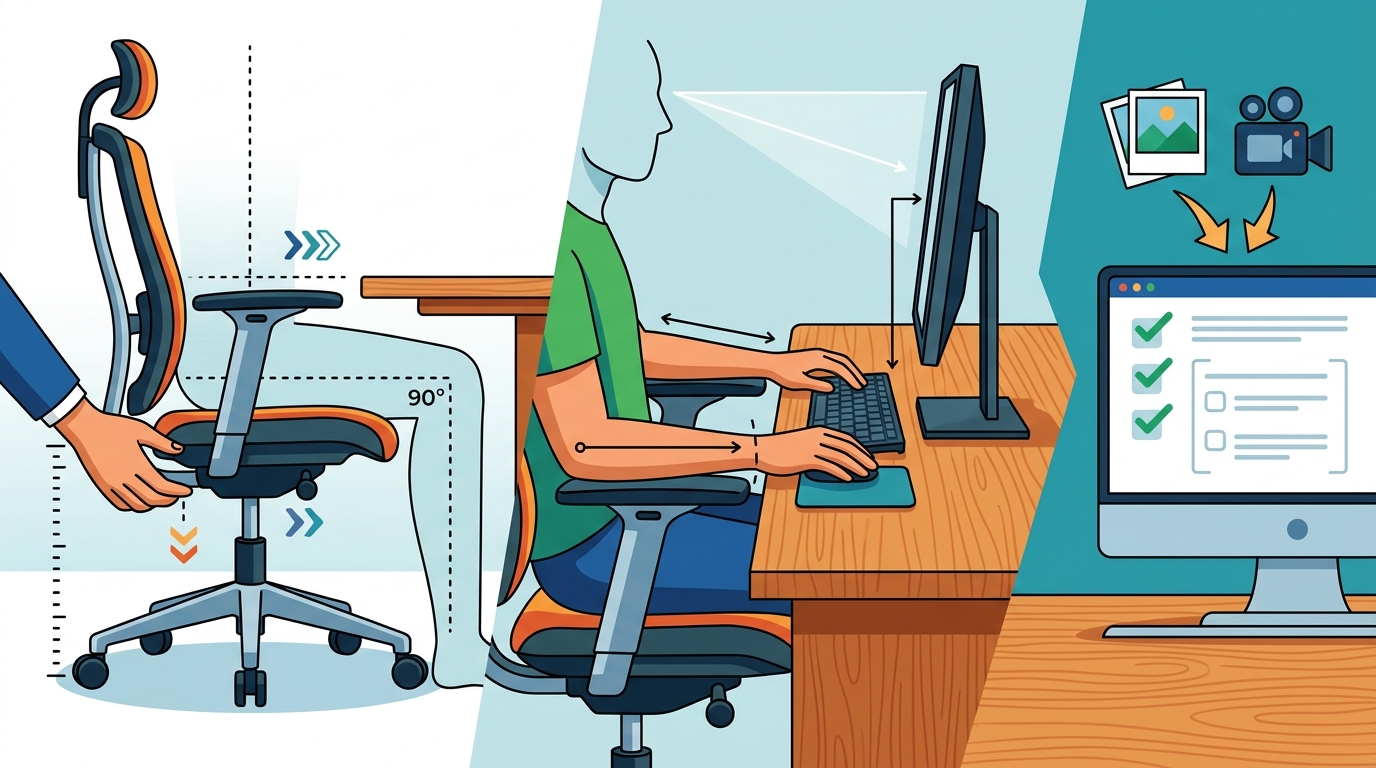
The core of the assessment involves fine-tuning the chair's mechanical features. A chiropractor will guide the user to adjust the seat height so that the thighs are parallel to the floor and the hips are slightly higher than the knees. This position helps maintain the natural curve of the lower back. The clinician also evaluates the seat depth, ensuring there is a small gap between the back of the knees and the seat edge to prevent pressure on the popliteal fossa.
The Role of Lumbar Support
Lumbar support is a critical component of any chair assessment. The provider will check if the chair's backrest aligns with the natural inward curve of the spine. If the chair lacks adjustable lumbar support, the chiropractor may suggest using a cushion or adjusting the backrest angle. This ensures that the spine is supported in a neutral position, reducing the strain on the lower back muscles during long periods of sitting.
Monitor and Keyboard Placement
While the chair is central, the desk and peripherals are equally important in a virtual assessment. The chiropractor will instruct the user to position the monitor so the top of the screen is at or slightly below eye level. This prevents the neck from tilting forward or downward, a common cause of cervical strain. The keyboard and mouse should be close enough that the elbows remain at the sides of the body, with the wrists in a neutral, straight position.
Elbow Height and Wrist Alignment
Proper elbow height is a key metric in this assessment. The user is asked to type while the clinician observes the angle of the forearms. Ideally, the forearms should be parallel to the floor, and the wrists should not be bent up, down, or to the side. If the desk is too high or low, the chiropractor will recommend a keyboard tray or monitor riser to achieve this neutral alignment.
Limitations of Online Consultations
While virtual assessments are effective for ergonomic setup, they have inherent limitations. A chiropractor cannot perform a physical examination to assess muscle strength, joint range of motion, or tissue quality. Therefore, online consultations are best used for workspace optimization rather than diagnosing specific medical conditions. If a patient experiences persistent pain, numbness, or weakness, a physical examination is necessary to determine the underlying cause.
When to Seek In-Person Care
Patients should be aware that a virtual ergonomic adjustment is not a substitute for medical treatment. If symptoms do not improve after adjusting the workspace, or if they worsen, an in-person visit is required. This ensures that any underlying musculoskeletal issues are properly diagnosed and treated by a qualified healthcare professional.
Practical Steps for Your Home Office
You can begin your own ergonomic assessment by following a few simple steps. First, sit in your chair and check if your feet are flat on the floor. If they are not, use a footrest. Next, adjust the seat height so your hips are slightly higher than your knees. Then, position your monitor at eye level and ensure your keyboard is close enough to keep your elbows at your sides. These adjustments can significantly improve your posture and reduce discomfort.
Using a Checklist
Creating a checklist can help you stay organized during your assessment. Include items such as seat height, seat depth, backrest angle, monitor height, and keyboard position. Check each item off as you make adjustments. This systematic approach ensures that you do not miss any important details and that your workspace is fully optimized.
Key Takeaways
- Virtual assessments focus on visual postural checks and equipment adjustments.
- Seat height should allow feet to be flat on the floor with hips slightly higher than knees.
- Monitor placement at eye level prevents neck strain.
- Keyboard and mouse should be close enough to keep elbows at the sides.
- Online consultations cannot replace physical examinations for diagnosing medical conditions.
- Persistent pain requires an in-person visit with a qualified clinician.
Frequently Asked Questions
Can a chiropractor diagnose a condition through an online consultation?
No, a chiropractor cannot diagnose a medical condition through an online consultation. Virtual visits are limited to ergonomic assessments and general guidance. A physical examination is required for any diagnosis or treatment plan.
What equipment do I need for a virtual ergonomic assessment?
You will need a device with a camera, such as a smartphone or laptop, and a stable internet connection. You should also have access to your workspace, including your chair, desk, and monitor, so you can demonstrate your current setup.
How long does a virtual ergonomic assessment take?
A typical virtual ergonomic assessment takes about 15 to 30 minutes. The duration depends on the complexity of your workspace and the number of adjustments needed.
Is a virtual assessment as effective as an in-person visit?
What if I don't have an adjustable chair?
If you do not have an adjustable chair, a chiropractor can suggest temporary solutions, such as using a cushion or a footrest. They may also recommend purchasing a chair with more adjustable features if your current setup is causing discomfort.
How often should I reassess my ergonomic setup?
You should reassess your ergonomic setup whenever you make changes to your workspace, such as moving your desk or changing your chair. It is also a good idea to check your posture regularly, especially if you experience any discomfort.
Conclusion
Virtual chiropractic consultations offer a practical way to optimize your office chair setup without leaving your home. By focusing on specific postural checks and equipment adjustments, these assessments can help reduce discomfort and improve your overall workspace ergonomics. Ask Dr. Grant provides valuable educational resources on these topics, helping you make informed decisions about your health and workspace. Remember that while virtual care is useful for ergonomic adjustments, it is not a substitute for in-person medical care. If you have persistent symptoms, consult a qualified clinician for a thorough evaluation.