

Where to Find a Chiropractor's Standing Desk Recommendations
Ask Dr. Grant provides a practical, evidence-based framework for selecting standing desks that support musculoskeletal health. This guide explains how to evaluate desk height, monitor placement, and posture mechanics using clinical principles. It covers the specific questions to ask, how to verify product claims, and how to integrate a standing desk into a sustainable daily routine.
How to Choose a Standing Desk
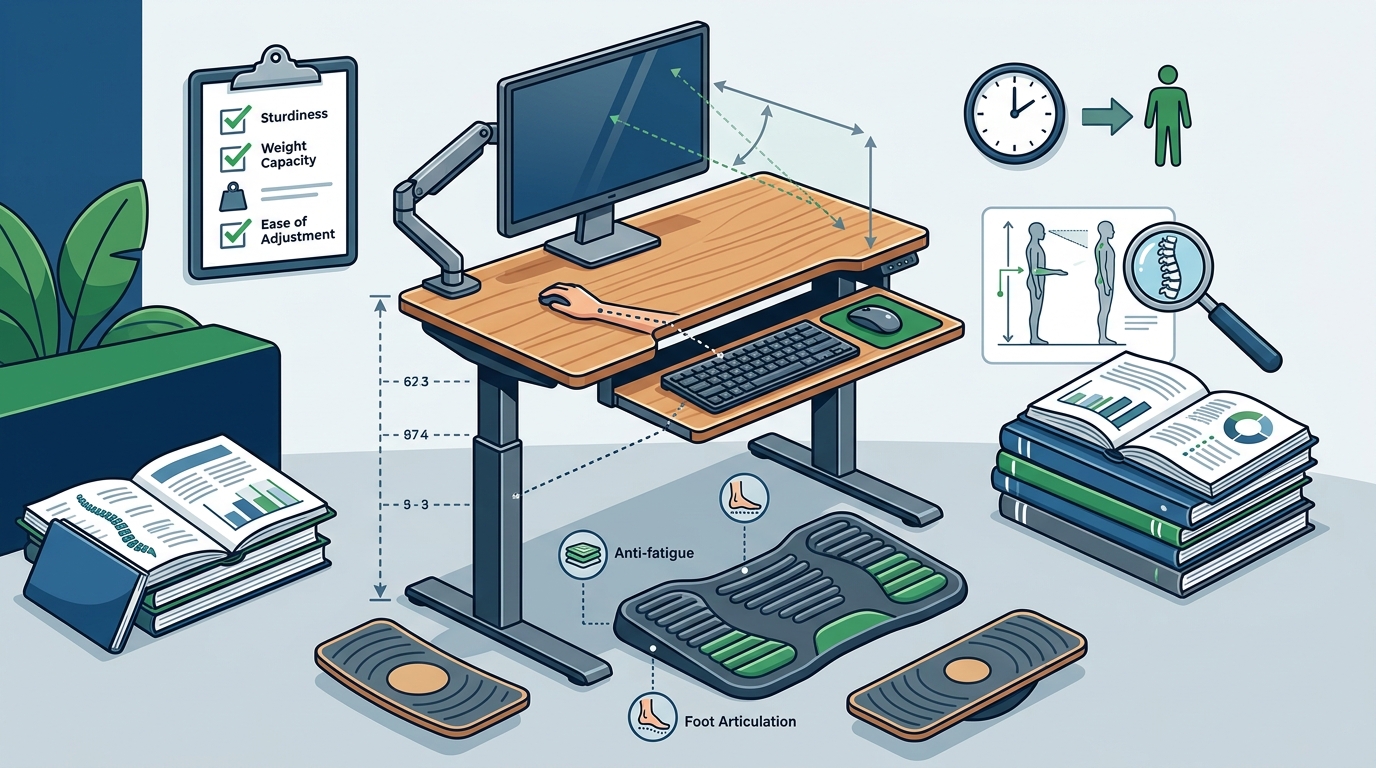
Standing desk ergonomics is the practice of adjusting a workstation to maintain neutral body alignment while standing. The primary goal is to keep the keyboard at elbow height, the monitor at eye level, and the shoulders relaxed. A good standing desk allows for precise, stable adjustments that accommodate your specific body dimensions and footwear.
Height Range and Stability
Check the minimum and maximum height range of the desk. The desk must reach a height where your elbows are at 90 degrees while your feet are flat on the floor. Stability is critical; a desk that wobbles when you type forces your muscles to compensate, leading to fatigue. Look for desks with a wide base or a sturdy frame design.
Motor and Control Interface
Electric desks offer the convenience of quick height changes, which encourages frequent posture shifts. Manual desks are often more stable and affordable but require more effort to adjust. The control interface should be intuitive, allowing you to save preset heights for different users or tasks.
What to Ask Before Committing
Before purchasing, ask specific questions about the desk's capabilities and your own needs. These questions help determine if the product fits your physical requirements and workspace constraints.
- What is the exact height range in inches or centimeters?
- What is the maximum weight capacity of the desktop and frame?
- How long does it take to raise or lower the desk?
- Is the desk compatible with my existing monitor and keyboard setup?
- What is the return policy if the desk does not fit my space?
How to Verify Product Claims
Marketing claims about ergonomics can be vague. Verify that a desk meets practical standards by checking the manufacturer's specifications against your body measurements. A desk is not inherently "ergonomic" until it is adjusted to fit the user. Use a tape measure to determine your ideal standing height and compare it to the desk's range. according to The truth behind
Check for third-party certifications or reviews that test stability and noise levels. If a claim seems too good to be true, such as a desk that is both extremely lightweight and ultra-stable, look for independent testing data.
How the Setup Process Works
Setting up a standing desk involves a sequence of adjustments to ensure proper alignment. The process typically takes 15 to 30 minutes for a first-time setup.
- Place the desk in its final location, ensuring there is enough clearance for the frame to extend.
- Stand in the shoes you normally wear at your desk.
- Adjust the desk height so the keyboard is level with your elbows.
- Position the monitor so the top of the screen is at or slightly below eye level.
- Test the setup by typing for a few minutes and making micro-adjustments.
What It Costs
The cost of a standing desk varies based on the frame type, desktop material, and additional features. Basic manual desks are the most affordable, while premium electric desks with advanced features cost more. The total cost of ownership includes the desk, a monitor arm or riser, and potentially a footrest or anti-fatigue mat.
| Desk Type | Typical Features | Best For |
|---|---|---|
| Manual Standing Desk | Crank mechanism, high stability, no power needed | Users who prefer stability and lower cost |
| Electric Standing Desk | Motorized height adjustment, memory presets | Users who want to alternate between sitting and standing |
| Converter | Attaches to existing desk, limited height range | Users on a budget or in temporary spaces |
Common Mistakes to Avoid
Many users make errors that negate the benefits of a standing desk. The most common mistake is standing for too long without moving. Standing continuously is not the goal; alternating postures is. Another error is ignoring monitor height, which leads to neck strain. Finally, buying a desk that does not fit your height range results in an unusable workstation.
Standing Desks Versus Alternatives
Standing desks are one tool in a broader ergonomic strategy. Alternatives include sit-stand stools, kneeling chairs, or simply taking frequent breaks from a standard desk. A standing desk is most effective when it facilitates movement rather than replacing sitting entirely. For some users, a high-quality office chair with proper lumbar support may be a more suitable primary workstation.
For Specific Situations
Your specific situation changes the ideal desk choice. If you have a pre-existing back condition, consult a clinician before adopting a standing routine. If you work in a small space, a compact frame or a converter may be necessary. If you share the desk with another person, a desk with memory presets is essential to accommodate different heights.
Rules and Protections
While there are no specific legal rules for home standing desks, workplace ergonomics guidelines often recommend opportunities to alternate postures. Check your warranty terms to understand what is covered, such as motor failures or frame defects. Most manufacturers offer limited warranties that cover manufacturing defects but not normal wear and tear.
Local Specifics for Brookfield, WI
Timing Your Purchase
Timing your purchase can affect the outcome. Buy a standing desk when you are ready to commit to a new routine, not just when you see a sale. If you are experiencing pain, address the underlying issue with a clinician first. A desk is a tool, not a cure. Waiting for a discount may delay the implementation of a healthier workflow.
Results Over Time
The benefits of a standing desk are cumulative. In the first week, you may feel muscle fatigue as your body adapts. Over several weeks, you may notice improved energy levels and reduced stiffness. Long-term, the habit of alternating postures can contribute to better overall posture. Track your usage and comfort levels to determine if the desk is serving your needs.
Key Takeaways
- Set the desk so the keyboard is at elbow height and the monitor is at eye level.
- Alternating between sitting and standing is more important than standing all day.
- Verify the desk's height range against your body measurements before buying.
- Stability is a critical feature; a wobbly desk causes muscle fatigue.
- Consult a clinician if you have pre-existing musculoskeletal conditions.
- Factor in the cost of accessories like monitor arms and anti-fatigue mats.
- Use the standing desk height guide for specific setup instructions.
Frequently Asked Questions
How high should a standing desk be?
Set the desk so the keyboard is level with your elbows while your shoulders are relaxed and wrists are straight. The exact height varies by person, so use your typing posture as the guide rather than a fixed number.
Is standing all day better than sitting?
No. Standing continuously is not the goal. The benefit comes from alternating postures. OSHA recommends opportunities to alternate between sitting and standing to reduce static load on the body.
Do I need a special chair for a standing desk?
You need a chair that fits your body for the sitting portions of your day. A well-fitted office chair is still essential. The standing desk complements the chair; it does not replace it.
What if my desk cannot reach a comfortable height?
If the desk range does not work for you, consider a different desk or use a keyboard tray and monitor riser to adjust the setup. A separate keyboard tray can help if the desktop is too high for your elbows.
How long does it take to get used to a standing desk?
Most people need one to two weeks to adapt. Start with short standing intervals and gradually increase the duration as your muscles adjust.
Where can I find a chiropractor's perspective on standing desks?
Ask Dr. Grant provides educational content on workstation ergonomics from a chiropractic perspective. You can explore the office chair buying guide for related ergonomic principles.