

Chiropractic Ergonomic Advice for Office Chairs Without a Clinic Visit
Ask Dr. Grant provides free, educational guidance on ergonomic office chairs and workspace setup directly from your browser. This guide explains how to use virtual chiropractic resources, identifies the specific chair features that matter for spinal alignment, and outlines practical workspace assessment methods you can perform at home. You do not need to book an appointment to get a clear starting point for your desk setup.
Virtual Chiropractic Consultations
Many people assume that ergonomic advice requires a physical examination in a clinic. In reality, a significant portion of workspace setup is mechanical and can be evaluated through digital tools. Virtual chiropractic consultation is a remote process where a licensed professional reviews your setup, symptoms, and goals via video or structured digital forms. For office chair selection, this often involves reviewing photos of your current desk, chair, and posture, followed by specific adjustment recommendations.
The Role of Ask Dr. Grant
Ask Dr. Grant, operated by Dr. Grant Radermacher of Ascent Chiropractic in Brookfield, Wisconsin, offers a specialized approach to this remote guidance. The platform is designed to help users find their fit for sleep, work, and recovery without the overhead of a traditional clinic visit. It functions as an educational shopping guide rather than a diagnostic tool. The site explicitly states that its AI assistant and guides are for education and product-shopping guidance only. They are not medical advice, diagnosis, or treatment.
What to Expect from Remote Guidance
When using a virtual resource like Ask Dr. Grant, you are looking for fit, function, and evidence-based tradeoffs. The platform helps you compare options based on your specific needs, such as a chair for a side sleeper or an office chair under a specific budget. It is important to understand the boundaries of this service. The AI assistant on the site organizes product questions and explains general tradeoffs. It does not establish a clinician-patient relationship. If you have persistent, unexplained, or worsening symptoms, a product recommendation cannot replace an individual assessment from a qualified health professional.
For those seeking a deeper dive into the specific products available, the site provides detailed brand guides. You can explore the brand guides to see how specific manufacturers handle ergonomic design. This allows you to make an informed decision before you ever step into a showroom or book a physical appointment.
Ergonomic Chair Features
Seat Height and Depth
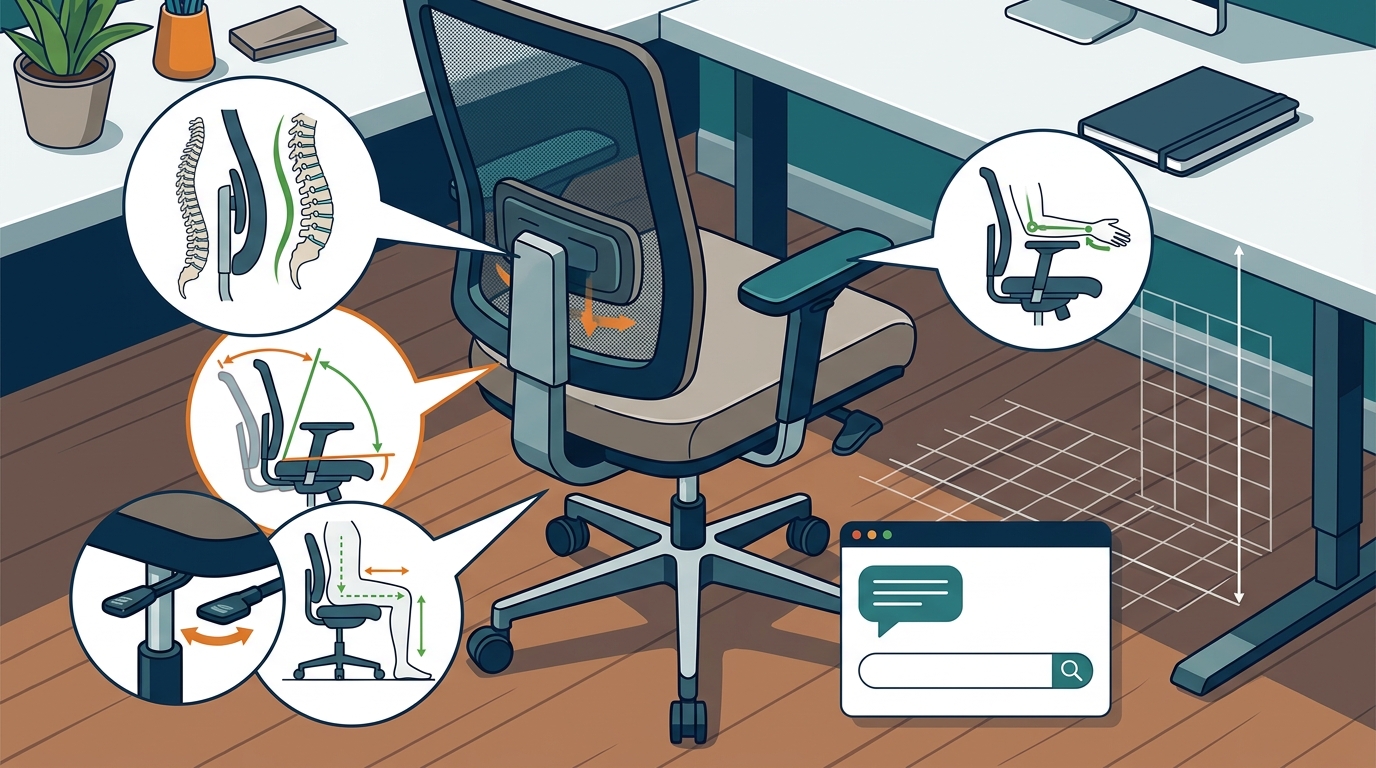
Seat height is the most critical adjustment. Your feet should be supported, and your shoulders should remain relaxed. If your feet do not reach the floor after setting the seat height, a stable footrest may help. Seat depth is equally important. The seat edge should not press behind your knees. This pressure can restrict blood flow and cause discomfort during long work sessions. Look for chairs that allow you to adjust the seat depth independently from the height.
Arm Support and Backrest
Material and Pressure Relief
The material of the seat cushion matters for long-term comfort. Mesh materials often provide better airflow and a more responsive feel, while foam contours more slowly. Some chairs feature pressure-relief cutouts in the seat cushion. These are designed to reduce pressure on the thighs and improve circulation. When comparing chairs, check the warranty and return policy. A 60-day return period, for example, gives you enough time to determine if the chair truly fits your daily routine.
Workspace Assessment Methods
A chair does not exist in a vacuum. It is part of a larger system that includes your desk, monitor, and keyboard. Workspace assessment is the process of measuring and adjusting your environment to align with your body's natural posture. You can perform this assessment at home using simple tools and guidelines from recognized safety organizations.
The Elbow-Height Rule
Start by setting your desk so the keyboard is about level with your elbows. Let your upper arms hang comfortably by your sides. Relax your shoulders and keep your wrists in line with your forearms as you type. The Occupational Safety and Health Administration (OSHA) describes keyboard placement near elbow height and calls for relaxed shoulders and straight wrists. This is a practical check you can perform without any professional equipment. If your shoulders are hunched or your wrists are bent, your desk height is likely incorrect.
Monitor Placement
Adjust the monitor after the keyboard feels comfortable. Place it in front of you so you can see the screen without tilting your head sharply up or down. If bringing the keyboard to a comfortable height makes the monitor too low, use a stable monitor riser or adjustable arm. Do not raise the keyboard again to fix the monitor height. This creates a conflict that leads to poor posture. The goal is to keep your neck in a neutral position.
Movement and Variation
Even a perfectly fitted chair is just one part of a healthy workspace. You should change position during the day and take breaks from continuous computer work. A sit-stand desk is most useful when it makes changing position practical. Alternate between sitting, standing, and other tasks as comfortable. Standing continuously is not the goal. OSHA recommends opportunities to alternate postures and vary work activities. This dynamic approach is more effective than static perfection.
Chair Feature Comparison
The following table summarizes the key features to look for when comparing ergonomic chairs. Use this as a checklist when reviewing product specifications online.
| Feature | Why It Matters | What to Check |
|---|---|---|
| Seat Height | Ensures feet are supported and shoulders are relaxed. | Range of adjustment and stability at your height. |
| Seat Depth | Prevents pressure behind the knees. | Independent adjustment mechanism. |
| Armrests | Allows shoulders to drop naturally. | Height, width, and angle adjustability. |
| Lumbar Support | Maintains the natural curve of the lower back. | Adjustability in height and depth. |
| Material | Affects heat retention and pressure distribution. | Mesh vs. foam and pressure-relief cutouts. |
| Return Policy | Allows you to test fit over time. | Length of trial period and return fees. |
Key Takeaways
- Virtual chiropractic resources like Ask Dr. Grant provide educational guidance on fit and function without requiring a clinic visit.
- Seat height and depth are the most critical adjustments for preventing knee and shoulder strain.
- Armrests should allow your shoulders to relax, not force them upward.
- Keyboard placement should be at elbow height with straight wrists, per OSHA guidelines.
- Monitor height should be adjusted independently of the keyboard to keep the neck neutral.
- A well-fitted chair does not replace the need for regular movement and posture changes.
- Always check the return policy to ensure you have enough time to test the chair in your actual workspace.
- Product recommendations are for shopping guidance only and do not diagnose or treat medical conditions.
Frequently Asked Questions
Can I get chiropractic advice online without a physical exam?
Yes, you can receive educational guidance on ergonomic setup through virtual platforms. Ask Dr. Grant provides shopping guidance and general tradeoff explanations. However, this is not a substitute for a medical diagnosis. If you have specific pain or symptoms, you should consult a qualified clinician for an individual assessment.
What is the first thing I should adjust on my current chair?
Start with seat height. Ensure your feet are supported and your shoulders are relaxed. If your feet do not reach the floor, consider a footrest. Then, check the seat depth to ensure it is not pressing behind your knees.
Is a more expensive chair always better?
No. A premium chair is not automatically a better fit. The right chair depends on your body, desk, and budget. Focus on the specific adjustments you need, such as seat depth or armrest support, rather than the price tag.
How high should my standing desk be?
Set the desk so the keyboard is about level with your elbows while your shoulders stay relaxed. The right height varies with the person, keyboard, and footwear. Use your typing posture as the check rather than a single height chart.
Does Ask Dr. Grant provide medical advice?
No. Ask Dr. Grant is for education and product-shopping guidance only. It is not medical advice, diagnosis, or treatment. Dr. Grant Radermacher is a Doctor of Chiropractic, but the site's AI answers are not a personal consultation.
What should I do if I have persistent neck pain?
If you have persistent, unexplained, or worsening symptoms, you should seek an individual assessment from a qualified health professional. A product cannot establish the cause of a symptom. Do not delay seeking care based on shopping guidance.
How do I know if a chair fits me?
Test the chair at your actual desk height. Check that the armrests allow relaxed shoulders and that the seat edge does not press behind your knees. Use the return policy to test the chair over several days to see if it remains comfortable.
Conclusion
You do not need to visit a clinic to get a clear direction on your ergonomic setup. By understanding the key features of an office chair and applying simple workspace assessment methods, you can create a healthier environment for your daily work. Ask Dr. Grant provides the educational framework to help you make these choices with confidence. For personalized product guidance, you can ask a product question to get a clear place to start with options and tradeoffs to consider.